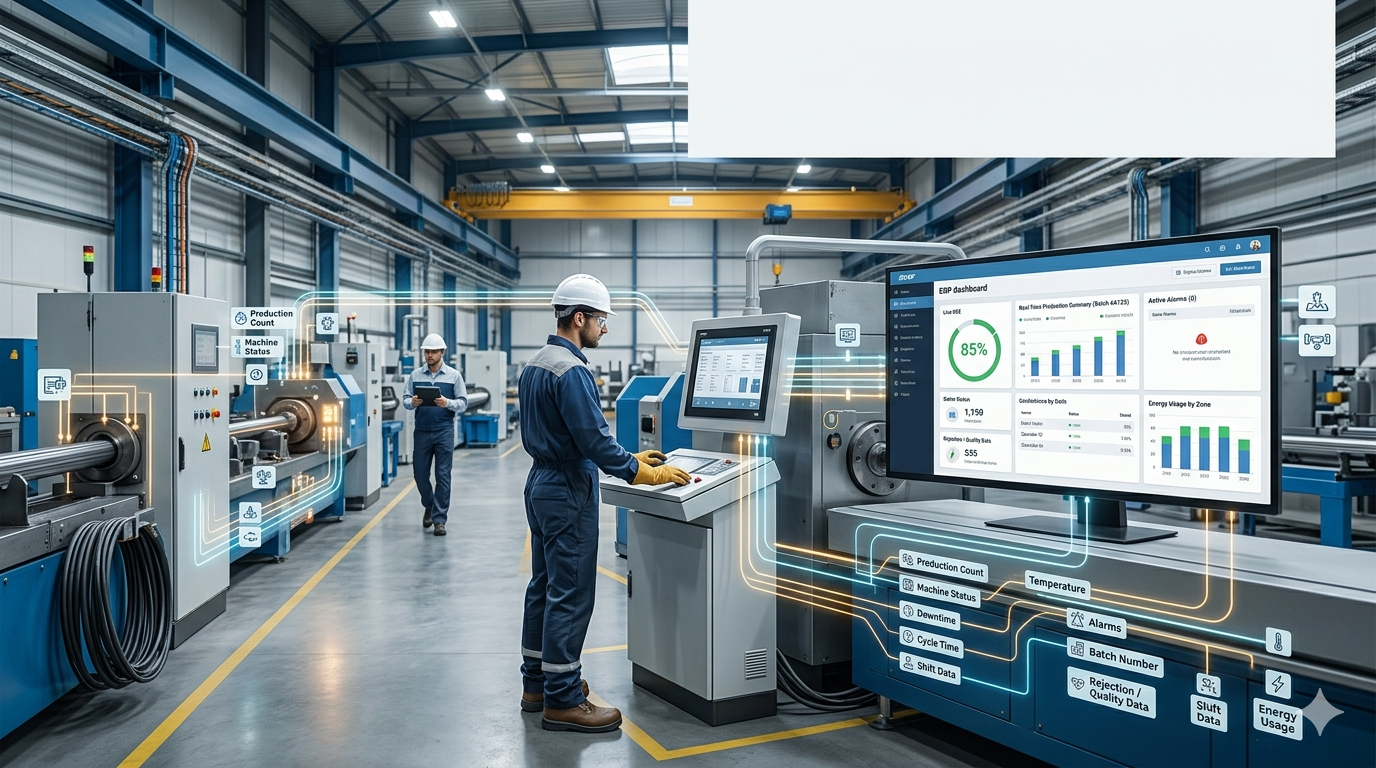
In steel manufacturing, machine data is only useful when it reaches the people who plan production, track quality, control maintenance, and commit delivery dates. That is where PLC and ERP integration becomes valuable. A PLC can tell you what is happening on the line right now. An ERP can turn that information into production visibility, traceability, costing insight, and better decisions.
For steel rod, wire, strand, LRPC, wire rope, and sling manufacturers, the real question is not whether PLC and ERP should be connected. The more practical question is this: what machine data should actually be captured, and what should be left out in the first phase?
This article gives a practical list for steel plants that want useful machine integration without creating a complicated project that nobody uses.
If you want to explore steel-focused digital transformation and ERP capabilities, you can also visit SteelExperts.in.
Why PLC and ERP Integration Matters in Steel Manufacturing
A PLC already controls machine behavior. It can track running status, counters, alarms, temperature values, speeds, and production signals. But on its own, that data stays close to the machine.
An ERP system becomes far more powerful when it receives selected machine data that supports:
- production planning
- WIP tracking
- quality documentation
- downtime analysis
- maintenance decisions
- traceability from process to finished product
This is especially important in steel environments where drawing lines, stranding machines, closing machines, furnaces, and handling systems all affect output, quality, and dispatch timing.
A strong integration does not mean capturing every tag from every PLC. It means capturing the right operational data in a structured way.
To understand how production, quality, inventory, and maintenance work together in a steel-specific environment, you can review SteelExperts ERP Modules.
The First Rule: Capture Business-Useful Data, Not Everything
Many automation projects become too complex because teams try to pull every possible signal from the machine. That creates noise, confusion, and extra integration effort.
A practical PLC to ERP integration should focus on data that helps answer real business questions such as:
- Is the machine running or stopped?
- How much was produced in this shift?
- Which job or batch is currently on the machine?
- What caused the downtime?
- Did the machine run within expected process limits?
- Is this line becoming a bottleneck?
- Can planning trust the output numbers?
That is the mindset that keeps the project useful and scalable.
Practical List of Data to Capture from Machines
1. Machine Status Data
What to capture
This is the most basic and most useful data set.
Capture:
- machine running status
- machine stopped status
- idle or waiting status
- setup or changeover status
- fault or trip status
- manual mode versus auto mode
Why it matters
This gives the ERP real-time visibility into whether a machine is available, producing, waiting for material, or down.
For production and planning teams, this helps answer:
- Which lines are active right now?
- Which bottleneck machine is down?
- Is the machine available for the next order?
For maintenance teams, it helps separate normal stops from true breakdowns.
2. Start Time and Stop Time Events
What to capture
Capture timestamped events for:
- cycle start
- job start
- job stop
- shift start activity
- shift end activity
- stop events with time stamps
- restart time after stoppage
Why it matters
These time stamps create the foundation for:
- runtime analysis
- downtime analysis
- shift-wise reporting
- utilization measurement
- OEE-style reporting
Without accurate start and stop time data, most production reports become estimates instead of facts.
3. Production Quantity Counters
What to capture
Capture machine-generated production counts such as:
- pieces produced
- coil count
- reel count
- meter count
- tonnage counter
- batch quantity completed
- accepted output count
- rejected output count if available
Why it matters
This is one of the most important data sets for ERP integration.
It helps the ERP:
- update production progress
- compare planned versus actual output
- calculate shift productivity
- estimate WIP and finished quantity
- support dispatch commitments
For steel wire and rope plants, quantity should be captured in the unit that actually matters to the process, such as meters, kilograms, reels, or coils.
4. Current Job or Order Reference
What to capture
The machine should be linked to a production order, job card, batch, or routing step. Depending on your setup, this can include:
- job number
- production order number
- batch number
- reel ID
- coil ID
- product code running on the line
- customer order reference where relevant
Why it matters
This turns raw machine data into meaningful production data.
Without job linkage, the ERP may know that a machine produced output, but it cannot reliably answer:
- Which order did this output belong to?
- Which reel was processed on which machine?
- Which batch was delayed due to downtime?
- Which route step is complete?
This is critical for traceability in steel manufacturing.
If your plant is working on better traceability and WIP visibility, the logic is similar to what we discuss in reel-level control and production visibility on SteelExperts.in.
5. Downtime Reason Codes
What to capture
When a machine stops, capture:
- downtime start and end
- operator-selected reason code
- PLC-generated fault code
- duration of the stop
- whether it was planned or unplanned
Typical reason groups may include:
- no material
- mechanical breakdown
- electrical fault
- quality hold
- setup change
- operator not available
- power issue
- maintenance activity
Why it matters
This is where PLC data starts becoming management information.
With downtime reasons, the ERP can report:
- top recurring stoppages
- machine-wise downtime trends
- shift-wise loss patterns
- production loss by reason
- maintenance priority areas
Without reason coding, you only know that the line stopped. You do not know why.
6. Speed and Throughput Data
What to capture
For relevant machines, capture:
- line speed
- actual production speed
- average speed by job
- speed changes during a run
- throughput rate per hour
Examples in steel plants include:
- drawing speed
- stranding speed
- closing speed
- furnace throughput rate
Why it matters
Speed data helps identify whether the machine is technically running but commercially underperforming.
This supports:
- performance benchmarking
- route optimization
- load balancing
- detection of hidden bottlenecks
- comparison across shifts, operators, and product types
A line that is running at reduced speed may be more damaging than a line that is briefly down.
7. Critical Process Parameters
What to capture
Do not capture every sensor value. Capture only the process parameters that matter for quality, stability, and traceability.
Depending on the machine, that may include:
- temperature
- motor load
- current draw
- pressure
- tension
- RPM
- vibration level
- furnace zone temperature
- lubrication flow status
- setpoint versus actual value
Why it matters
These values help connect process behavior to quality and machine performance.
For example:
- abnormal temperature may explain quality variation
- high motor load may signal wear or overloading
- tension variation may affect wire quality
- unstable furnace temperature may affect mechanical properties
This is especially useful when building stronger quality records and predictive maintenance logic.
For general industrial automation standards and interoperability concepts, the OPC Foundation is a useful reference: OPC Foundation.
8. Alarm and Fault Events
What to capture
Capture major alarms and machine faults such as:
- fault code
- alarm description
- time of occurrence
- reset time
- severity level if available
- repetition count
Why it matters
Fault history gives value to both operations and maintenance.
It helps you identify:
- recurring machine problems
- hidden reliability issues
- frequent micro-stops
- faults linked to a specific product or shift
ERP users do not need every low-level technical alarm. Focus on the alarms that affect uptime, quality, or output.
9. Setup and Changeover Data
What to capture
Capture setup-related events such as:
- job change start time
- job change complete time
- parameter recipe loaded
- product change from one size or type to another
- setup confirmation by operator or supervisor
Why it matters
In steel plants with frequent size changes, grade changes, or construction changes, setup time directly affects capacity.
This allows the ERP to measure:
- changeover time by machine
- product family impact on setup
- planning loss due to frequent switches
- actual versus expected setup performance
That data is extremely useful for planners trying to improve scheduling logic.
10. Quality-Linked Production Signals
What to capture
Where possible, capture selected production-linked quality signals such as:
- pass or fail status
- reject trigger count
- wire break count
- quality hold flag
- process deviation event
- inspection release signal
Why it matters
This helps connect machine behavior with quality outcomes.
For example:
- repeated wire breaks on one line may indicate process instability
- reject spikes on a shift may point to setup issues
- a quality hold flag should stop the ERP from assuming the batch is ready
This becomes even more valuable when combined with ERP-based quality documentation and batch traceability.
To learn more about building structured quality and compliance records in steel manufacturing, you can also explore About SteelExperts and related resources across the site.
11. Energy and Utility Consumption Data
What to capture
If your setup allows it, capture selected utility data such as:
- machine-level power consumption
- energy per shift
- energy per batch
- compressed air usage for critical systems
- furnace fuel consumption where practical
Why it matters
This is often a second-phase integration, but it can deliver strong insight.
It supports:
- cost analysis
- energy benchmarking
- cost per ton or per reel
- detection of abnormal energy usage
- sustainability reporting
In high-energy steel operations, even simple visibility into energy trends can improve cost control.
12. Maintenance-Related Counters
What to capture
Capture machine counters that support maintenance planning, such as:
- run hours
- cycle count
- production meter count since last maintenance
- component usage count
- lubrication interval count
Why it matters
This helps maintenance move from calendar-only planning to usage-based planning.
It supports:
- preventive maintenance triggers
- maintenance scheduling based on actual load
- early detection of overused assets
- better spare planning
This is also the first step toward more intelligent maintenance alerts.
For broader automation and industrial control guidance, ISA is another useful external reference: International Society of Automation.
What Not to Capture in the First Phase
1. Every raw PLC tag
Not every bit, register, or internal status is useful to ERP users.
2. Highly technical engineering values with no business use
If it does not affect production, quality, maintenance, or planning, it usually does not belong in the first phase.
3. Unfiltered high-frequency data
ERP systems are not historians. Very fast sensor data should usually stay in SCADA, HMI, or historian layers unless summarized.
4. Data with no job or machine context
Numbers without timestamps, machine identity, or order context create confusion.
The goal is practical visibility, not data overload.
Best Way to Structure PLC + ERP Integration
1. Start with one critical line
Choose one machine or one process area such as:
- a wire drawing line
- a stranding machine
- a closing machine
- a furnace line
That keeps the first phase manageable.
2. Define business use before tag mapping
Before integration begins, define:
- which reports will use the data
- which departments need the data
- which decisions the data should support
This avoids collecting information that no one uses.
3. Standardize machine naming and event logic
Make sure your plant uses clear naming for:
- machine IDs
- line names
- fault categories
- downtime reason groups
- order references
This helps ERP reporting stay clean.
4. Link machine data with production context
Machine signals become much more powerful when linked with:
- job cards
- product codes
- reel IDs
- batch numbers
- shift information
That is what turns automation data into operational intelligence.
5. Expand in phases
A good rollout sequence is:
- Phase 1: machine status, downtime, quantity
- Phase 2: speed, alarms, setup, basic quality signals
- Phase 3: process parameters, maintenance counters, energy data, analytics
This approach keeps the project realistic and easier to adopt.
How SteelExperts ERP Fits This Use Case
A generic ERP may store production transactions, but steel manufacturing needs more practical logic around machines, WIP, quality, and traceability.
A steel-focused platform like SteelExperts.in is better positioned to use machine data in a meaningful way because it can align PLC signals with:
- production orders
- heat and coil traceability
- reel or batch movement
- quality checkpoints
- downtime reporting
- maintenance planning
If you want to see how this fits into a broader module structure, review SteelExperts ERP Modules.
If you want to understand the company’s focus and approach to steel manufacturing, visit About SteelExperts.
Common Mistakes to Avoid
Capturing too much data too early
This creates complexity and delays value.
Ignoring operator-friendly reason selection
Downtime analysis becomes weak if stop reasons are not captured in a simple way.
Treating ERP like a raw data historian
ERP should receive filtered, structured, business-relevant events and summaries.
Skipping master data discipline
If machine IDs, order numbers, and batch references are inconsistent, reporting becomes unreliable.
Starting with dashboards before data quality
Dashboards only help when the underlying data is trustworthy.
Frequently Asked Questions
What is the most important machine data to capture first?
Start with machine status, start and stop times, production quantity, and downtime reasons. These four areas deliver the fastest operational value.
Should we connect every PLC in the plant to ERP?
No. Start with one critical process area and capture only the data that supports planning, production, quality, or maintenance decisions.
Is PLC to ERP integration only useful for large steel plants?
No. Even small and mid-sized plants benefit when they can see real output, downtime, and machine availability without depending only on manual reporting.
Can ERP directly read raw PLC data?
It can, but in many cases it is better to use an integration layer, middleware, SCADA, or OPC-based approach so that ERP receives filtered and structured data.
How does this help wire and rope manufacturers specifically?
It improves machine-level visibility for drawing, stranding, closing, and related operations. That means better production tracking, stronger WIP control, more reliable planning, and clearer downtime analysis.
Conclusion
PLC and ERP integration becomes useful when it stays practical. The goal is not to capture every signal from every machine. The goal is to capture the data that improves production visibility, quality control, maintenance planning, and delivery confidence.
For steel rod, wire, strand, LRPC, wire rope, and sling manufacturers, the best starting point is simple: machine status, runtime, output quantity, downtime reasons, and selected process signals tied to real jobs and batches.
Once that foundation is in place, your plant can expand into deeper automation, better analytics, and smarter decision-making without creating unnecessary complexity.
For more steel-specific ERP, automation, and digital transformation insights, explore SteelExperts.in.